
How to Unlock Custom Validation Error Banners in NetSuite's SCM Mobile
Background
This is relevant if you are customizing NetSuite SCM Mobile and seeking to enhance the user experience by displaying more meaningful error messages or customizing the error banners that appear during form validation in the mobile app. If you want to provide context-specific feedback to help users understand exactly what went wrong and how to resolve it, this trick can help.
Note: This applies only when validation is performed server-side. Client script validation is not covered in this article.
The Challenge & Discovery
When I first customized SCM Mobile, I ran into the challenge of needing a way to show custom error messages during form validation. The mobile app didn’t offer an obvious method for adding these messages like the standard NetSuite Banners. Although Dynamic Texts were available, I found it more effective to use the native mobile banner.
How NetSuite SCM Mobile Handles It
After some discovery work and analyzing network activity in Developer Tools, I found that the app consistently received the same properties during validation from SCM's RESTlets. It looked like this:
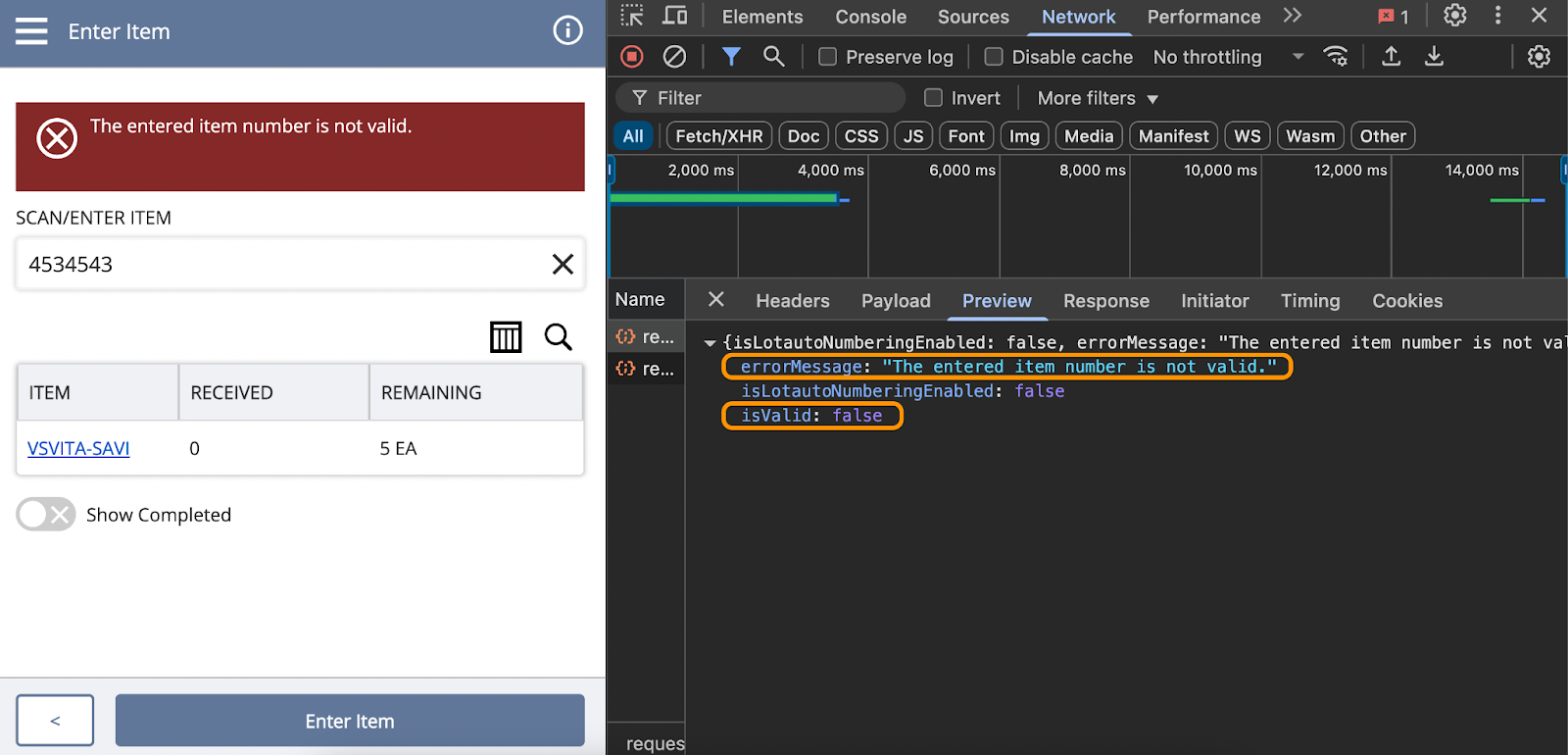
The response includes two key properties: isValid and errorMessage.
The isValid property is a boolean (either true or false), indicating whether the validation passed or failed.
The errorMessage property contains the error message to be displayed when isValid is false.
This made it possible for me to create my own custom messages using that response format.
Enhancing Validation with RESTlets
Since some validations require server-side processing, creating a custom RESTlet is a logical choice. You could include the same properties in the response, similar to this, to return a custom message:
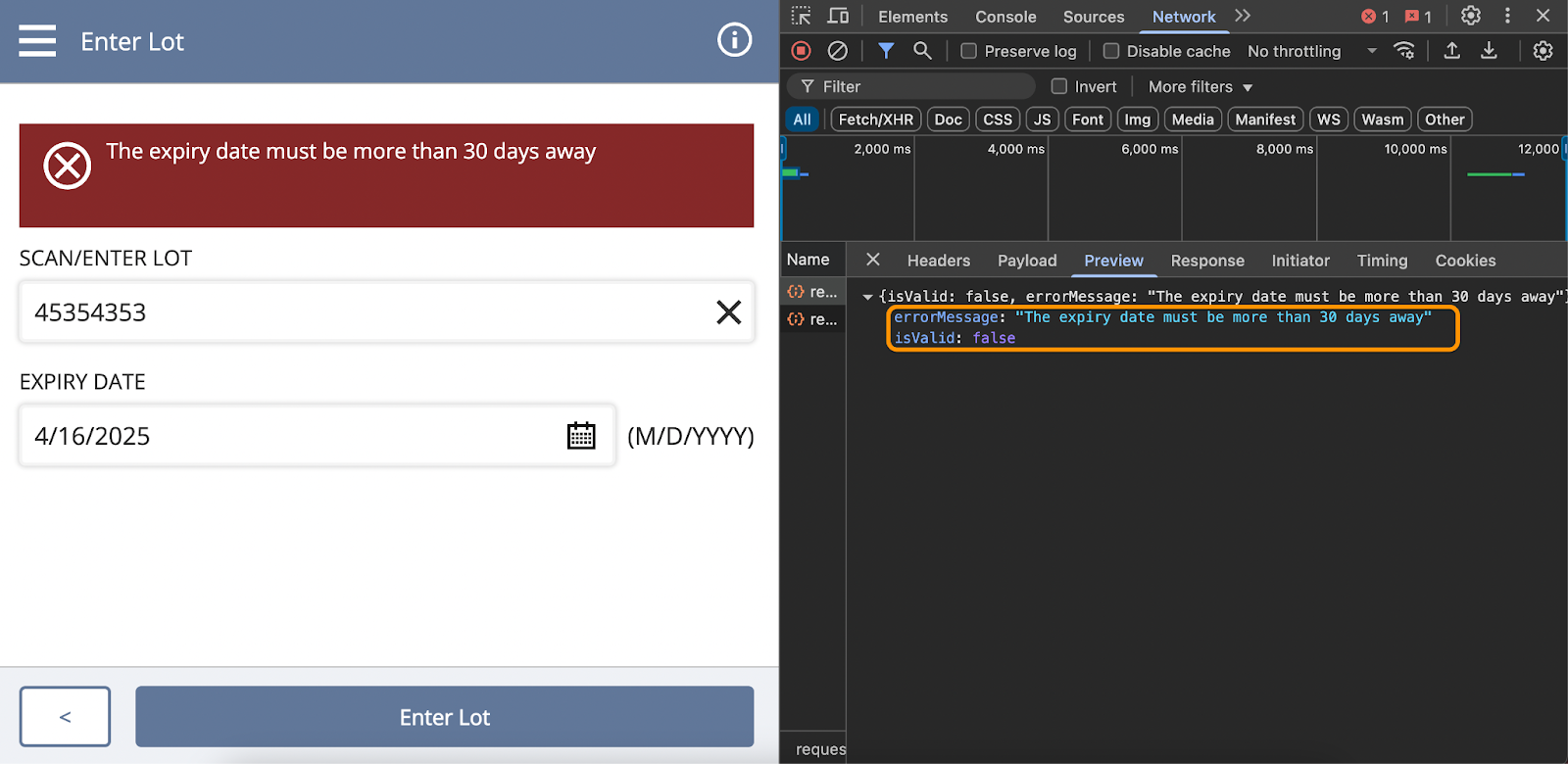
In this scenario, when the user enters an invalid date and clicks the Enter Lot button, it triggers another custom action that calls a custom RESTlet for validation.
Below is an example of a RESTlet script that enables custom validation error banners in SCM Mobile
/**
* @NApiVersion 2.1
* @NScriptType Restlet
*/
define([], () => {
const post = (requestBody) => {
return {
isValid: false,
errorMessage: "The expiry date must be more than 30 days away"
}
}
return {post}
});
Final Thoughts
By leveraging RESTlets and using the existing validation handling of the app, you can display custom error messages in the Mobile utilizing the native error banners. This approach ensures users receive clear, actionable feedback during form validation, improving the overall experience.
Work with the Best NetSuite Developers in the Philippines
As we continue to explore the full potential of SCM Mobile and uncover new techniques, we’re always looking to share insights and collaborate with professionals working on similar challenges. If you're exploring ways to enhance SCM Mobile or implement custom solutions, let’s connect and innovate together.

Meet the Author
With over a decade of hands-on experience in NetSuite development, Vanessa has worked with global NetSuite partners and end-users, specializing in implementation, integration, administration, and support. She has also mentored fellow NetSuite developers during her consulting career. In 2015, Vanessa co-founded CloudCompass Technologies, an independent NetSuite practice focusing on managed services.
Tags
Accelerate ERP Success with Expert Solutions
Ready to put what you've learned into practice? ATSOURCE delivers both the specialized talent and comprehensive NetSuite support you need to turn strategy into results.Connect with our experts today and move from planning to performance.